The Token System in Planoplan
Freedom and Control in Cloud Resource Management
- 9 december 2025
- 4092
The month has just begun, but all your preview renders are already used up. Those 4K panoramas have been sitting in your balance for six months and will stay there for another six. Meanwhile, your QHD and 4K renders are running out, and it’s time to buy a new package — but buying two at once is too expensive. Sound familiar?
The new Token System is designed to solve all these problems and improve your workflow for the better. With the December update of Planoplan, we’re moving away from rigid render and panorama packages and embracing universality and freedom.
What are Tokens, and what makes them powerful?
Tokens are a new universal currency for performing resource-intensive tasks in Planoplan, such as renders and panoramas. They replace static packages. In simple terms: instead of buying a predefined package of renders and panoramas, you purchase universal units — tokens. You spend them exactly on what you need at the moment, allocating resources based on the task, not a preselected package.
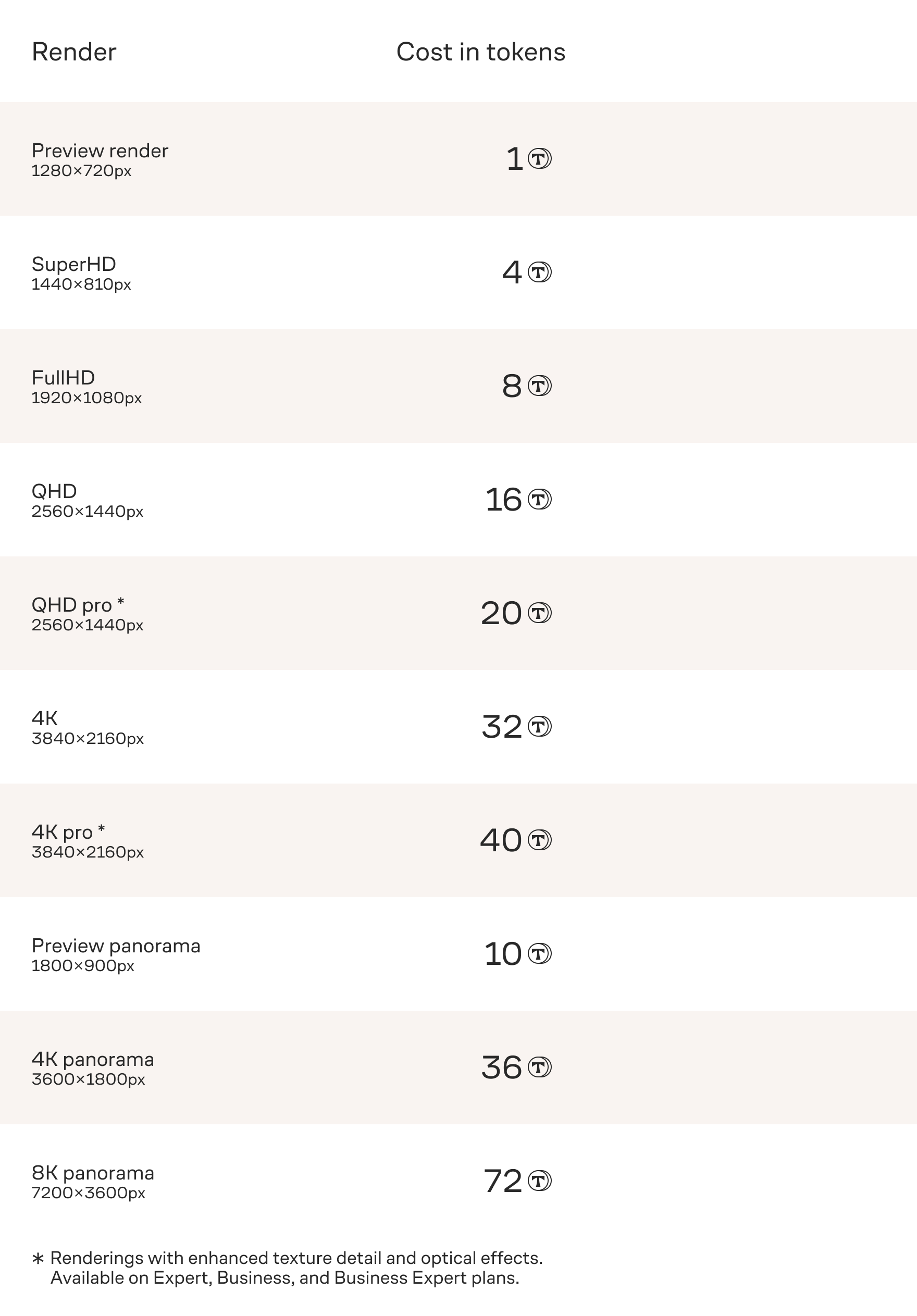
Key benefits of the new system:
- Universality. No more guessing how many renders or panoramas you’ll need. You buy one type of asset — tokens — and use them for any task: whether it’s a detailed panorama for a client or a trial preview render to test an idea.
- Freedom for creativity and perfect results. Focus on quality, not limits. Use tokens for quick sketches, lighting tests, and experiments. And when your project is ready for the final touch — spend them on maximum quality renders. You pay only for the level of detail you need right now.
- Full control over resources and budget. You decide when, how many, and on what to spend your tokens. This provides unprecedented transparency in expenses and control over project economics.
Two types of tokens: your operational support and strategic reserve
To offer you maximum benefit and convenience, we’re introducing two categories of tokens.
Expiring tokens — your regular support.
These tokens are added monthly as part of your tariff plan (each tariff has its own amount). They refresh every 30 days and are perfect for operational tasks, daily work, and minor adjustments. A guaranteed reserve for routine work.
Important: Only on the Expert tariff, with a linked card and auto-payment enabled, expiring tokens can be carried over to the next month, but no more than 100 tokens. (Details in the FAQ section of this article)
Non-expiring tokens — your strategic reserve.
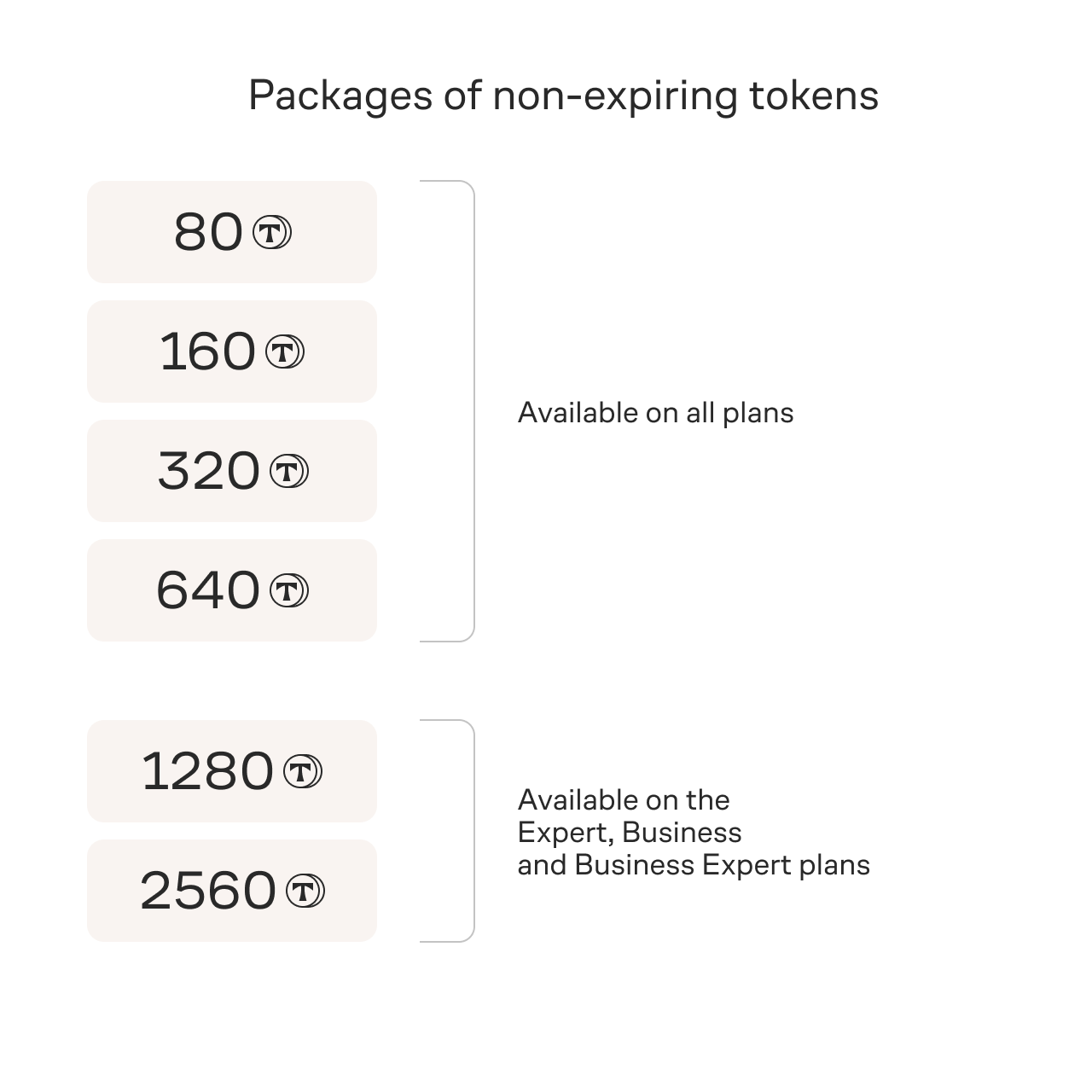
These tokens are purchased in packages from our store. Their main superpower is no expiration date. Buy them today — use them a year later. They simply wait on your balance until you need them. And the larger the package, the lower the price per token. This is the most cost-effective way to equip yourself with a powerful resource for large projects and long-term planning.
Important: Separate advantageous packages are available for purchase for higher tariffs: Expert, Business, and Business Expert. Information is provided below.
What happens to already purchased render packages?
It’s simple:
- You can continue using them. All your current render and panorama packages will remain on your balance and work under the old system until you use them up.
- Or convert the remaining old renders into tokens. If you want to immediately enjoy all the benefits of tokens and get rid of unwanted leftovers on your balance, contact our support team. We’ll help convert the remaining old renders into new non-expiring tokens at a special rate (see the render/token conversion table in this article) and ensure you get maximum benefit from the transition.
This transition is an important step toward a more convenient and economical Planoplan. Very soon, we’ll publish a separate article titled “Pricing Changes” with all the details: exact prices for token packages and updated tariffs. We’re confident that the new Token System will make your work even more productive and comfortable!
FAQ: Frequently Asked Questions
– Do I understand correctly that I can spend tokens on preview renders in any quantity?
Yes. Previously, you couldn’t purchase additional preview renders, and they ran out quickly. Now you can allocate resources however you like.
– What happens to my currently purchased renders?
They’ll remain on your balance and will be available for use under the old system until fully spent.
– What will happen to my preview renders and preview panoramas on my balance when transitioning to the new system? Will they expire?
At the time of release, all unused preview renders will be converted into expiring tokens at a 1:1 rate, and preview panoramas at a 1:10 rate. You can spend these expiring tokens on preview renders, preview panoramas, or anything else as usual, without losing anything. The conversion is necessary due to the technical requirements of transitioning to the new system.
– Can I convert other accumulated renders and panoramas into new tokens?
Yes. For this, you need to contact our support team, and we’ll help transfer the remaining balances into non-expiring tokens at a special rate (see the render/token conversion table in this article).
– How will my token balance carry over to the next month if auto-payment is enabled?
Non-expiring tokens (purchased by you) will carry over in full. Expiring tokens (added by us monthly) will expire. However, if you’re on the Expert tariff, have auto-payment set up, and a linked card, expiring tokens will carry over to the next month, but no more than 100 tokens. Even in this case, the carried-over tokens will remain expiring and may expire later.
– How are tokens spent: expiring vs. non-expiring?
Expiring tokens are spent first, and only then non-expiring tokens.
– Where can I find exact prices for tokens and tariffs?
Detailed information on prices and tariffs is published in a separate article, “Pricing Changes”.